

Product details

What's Included

The template includes 17 tabs designed to manage your sales pipeline, client relationships, invoicing, and business operations:

  • Instructions – Comprehensive setup guide, best practices, and video tutorial
  • Setup – Configure business preferences, tax settings, currencies, workflows, and automation options
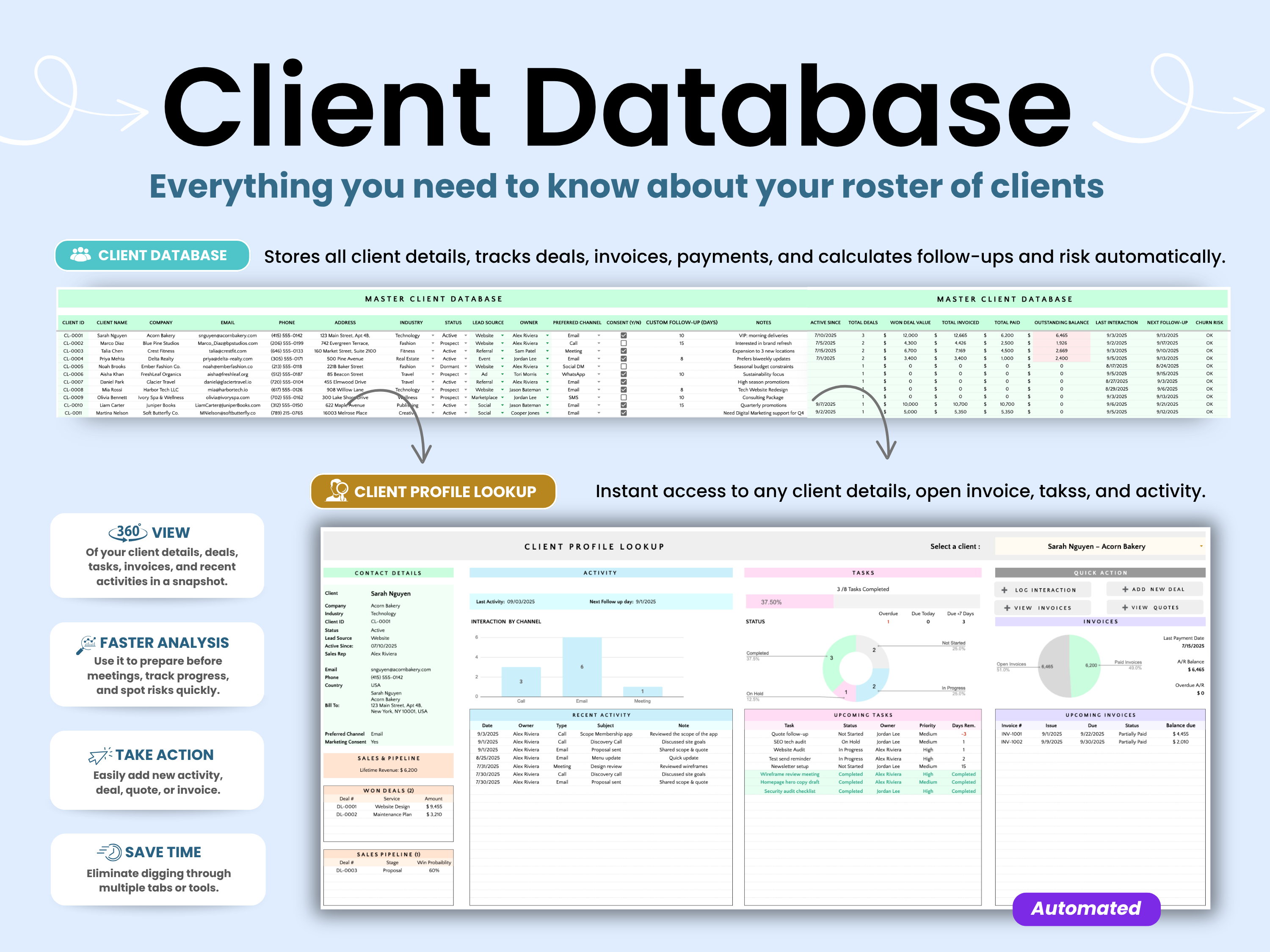
  • Master Client Database – Centralized client records and contact management
  • Client Profile Lookup – Instantly access a complete client history and activity record
  • Deals Tracker – Manage opportunities, sales stages, and pipeline performance
  • Quote Items – Build reusable quote line items and pricing structures
  • Quote Generator – Generate professional quotes in minutes
  • Invoice Items – Create reusable invoice line items and services
  • Invoice Manager – Track invoices, balances due, and payment status
  • Invoice Generator – Generate branded invoices and PDF exports
  • Payments – Monitor revenue, balances, and payment activity
  • Tasks Tracker – Manage priorities, assignments, and deadlines
  • Smart Calendar – View tasks, reminders, and upcoming activities
  • Interactions – Log meetings, calls, notes, and client communications
  • Follow-Ups – Track relationship-building activities and client touchpoints
  • Reminders System – Automated reminders, notifications, and activity logs
  • Dashboard – Monitor 60+ KPIs, metrics, trends, and business performance indicators
key Benefits
  • Manage clients, deals, quotes, invoices, payments, tasks, and follow-ups in one place
  • Save hours of manual admin work with built-in automations
  • Generate professional quotes, invoices, and PDFs directly from Google Sheets
  • Send transactional emails and client reminders faster
  • Keep client files organized with Google Drive archiving
  • Track your sales pipeline, active deals, revenue, balances, and business activity with ease
  • Stay on top of deadlines with automated reminders and task tracking
  • Monitor 60+ KPIs to understand performance, productivity, revenue, and growth
  • Customize 40+ settings to match your services, workflow, currency, taxes, and business model
  • Improve client management with a complete client profile lookup and interaction history
Who is this for

This Client Tracker Pro CRM is ideal for:

  • Freelancers – Manage clients, deals, quotes, invoices, and follow-ups without needing expensive CRM software.
  • Consultants – Track client engagements, proposals, billing, communications, and next steps in one organized system.
  • Agencies – Keep multiple clients, deals, tasks, payments, and team activity connected in one workspace.
  • Coaches – Manage client relationships, sessions, invoices, reminders, and follow-ups with less manual work.
  • Service Providers – Organize your full workflow from first inquiry to final payment.
  • Virtual Assistants – Track client tasks, deadlines, invoices, communication logs, and ongoing responsibilities.
  • Small Business Owners – Gain better visibility into clients, revenue, operations, and business performance.
  • Solopreneurs – Run a more professional business with a powerful CRM system that stays simple to use.

Whether you're managing a small client list or a growing service business, this CRM spreadsheet helps you stay organized, reduce repetitive work, and keep every client detail in one place.

The Smart Kit Difference

Most CRM spreadsheets help you store client information. Client Tracker Pro goes much further by helping you manage your full client lifecycle while automating repetitive admin work behind the scenes.

  • Generate quotes, invoices, receipts, and PDFs without leaving the spreadsheet
  • Automate reminders, follow-ups, and transactional emails
  • Archive documents directly to Google Drive for easier record keeping
  • Track your pipeline, client activity, payments, tasks, and performance in one connected system
  • Use 60+ KPIs to identify trends, opportunities, and risks
  • Customize 40+ settings to match the way your business works

Built for business owners who want more than a basic client database, this system helps you save time, stay organized, and manage your client operations more professionally.

Important Notes
  • One-Time Payment: Pay once and enjoy unlimited access with no subscriptions or recurring fees.
  • Digital Download: This is a digital product. No physical item will be shipped.
  • Google Sheets Compatible: This template is designed exclusively for Google Sheets and is not compatible with Microsoft Excel.
  • Access Requirements: A free Google account is required to use this spreadsheet.
  • Reusable: Use the template again and again by creating a fresh copy whenever needed.
Disclaimer

This spreadsheet is provided for informational and organizational purposes only. Smart Kit Designs does not provide business, financial, accounting, tax, or legal advice.

Users are responsible for verifying the accuracy of their records and consulting qualified professionals when making business, financial, accounting, tax, or legal decisions.

Under no circumstances shall Smart Kit Designs be held liable for any direct, indirect, incidental, or consequential loss, damage, or expense arising from the use of this spreadsheet.

Google Sheets is a trademark of Google LLC. Smart Kit Designs is not affiliated with, endorsed by, or sponsored by Google LLC.

See the template in action

Explore every feature, dashboard, automation and tool included in the template through our detailed walkthrough. Learn how the system works together and pick up practical tips to help you stay organized, get paid faster and get better results with your clients.

Watch the Video Tutorial

FAQs

Please read our FAQs page to find out more.

Is this a one-time purchase or a subscription?

This is a one-time purchase. There are no monthly fees, subscriptions, or recurring charges. Once purchased, the template is yours to use indefinitely.

What do I receive after purchase?

After purchase, you'll receive a link to open the template in Google Sheets. Simply make your own copy and save it to your Google Drive. No physical product will be shipped.

Are instructions included?

Yes. Every template includes written instructions to help you get started. Many templates also include a step-by-step video walkthroughs covering setup, features, and best practices.

Can I customize the template?

Yes. All templates are fully editable and can be customized to fit your needs, including categories, labels, colors, and other settings where applicable.

What if I accidentally delete a formula or make a mistake?

No worries. Most changes can be reversed using Google Sheets' Undo feature or Version History. Every Smart Kit Designs template also includes access to a fresh copy, so you can always start over if needed.

What is the standard license?

With the standard license:

You may:

  • Use the template for personal use
  • Use the template within your own business
  • Share with internal team members
  • Customize the template
  • Deliver copies to clients as part of your services

You may not:

  • Remove Smart Kit Designs branding
  • Resell the template as a standalone product
  • Redistribute the template outside of client engagements
Do you offer refunds?

Due to the digital nature of our products, all sales are final and refunds cannot be provided once access has been granted. Please review the product description and preview images carefully before purchasing.

Didn’t find your answer?

Don't hestitate to contact us